Vector vs. Raster Logos: Which File Type Gives the Best Results?

Vector vs. Raster Logos: Which File Type Gives the Best Results?
Vector is the better master file for a logo. It is the version to keep when the mark may end up on a storefront, product box, business card, embroidered shirt, or anything else where the final size is still unknown. Raster has an important role too, especially online, but it should usually come from that master rather than replace it.
The difference becomes obvious the first time a small digital logo has to become something physical. A PNG that looked perfectly clean in an email signature can turn into a headache when a printer asks for artwork large enough for a sign. Enlarging the image does not create the missing detail. It only spreads the existing pixels across a larger area.
Here is a practical answer to the most common question: what file formats do I need for my logo?
A master vector file should always be kept editable, with proper digital exports ready for wherever the logo goes. What that list includes can shift, but a single low-res image is not a logo library.
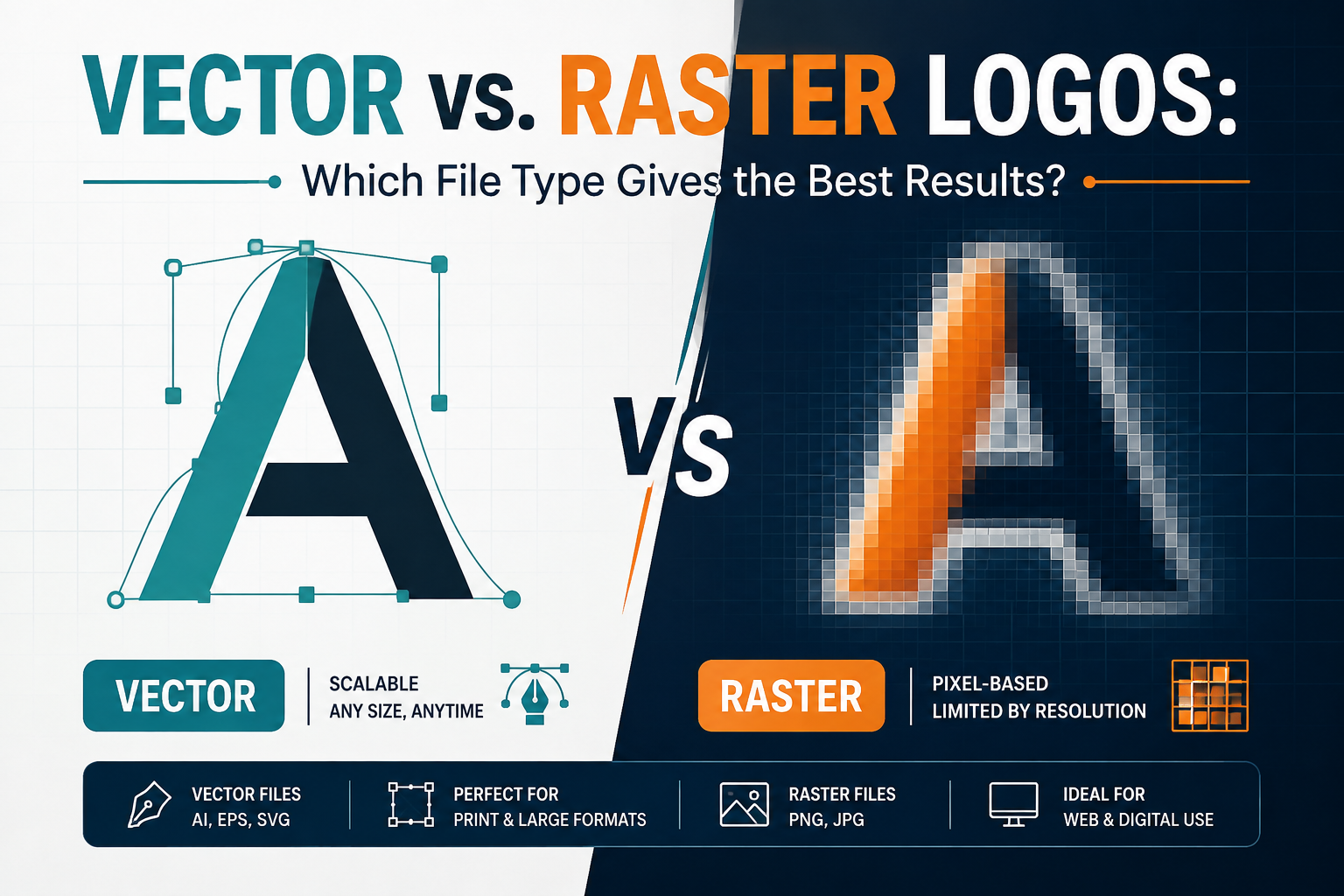
Vector files describe the logo through paths, curves, lines, and shapes. Raster files describe it through pixels. You do not need to understand the mathematics behind either system to make the right choice. The useful distinction is what happens when the logo has to change size or move into another production workflow.
A vector mark can be rendered at business-card size or enlarged for a sign without the same pixelation problem. That is why designers generally protect the vector source. It gives future work somewhere solid to start.
Quick FAQ: What Counts as a Vector Logo File?
AI, EPS, and SVG are common vector formats. They serve different workflows, so the receiving vendor's specification still matters. The important point is that the file contains actual vector artwork rather than a PNG or JPEG sitting inside a file with a different extension.
A Logo Can Be Sharp on Screen and Still Be the Wrong File
Raster files are not the enemy. They are often the right choice when a platform expects a pixel image. A transparent PNG, for example, is useful for a website header, presentation, email signature, or social graphic. It can sit over a background without dragging a white rectangle along with it.
The trouble starts when a raster export gets promoted to the role of master file. Every raster image has a finite amount of pixel information. Give it more physical space than that information can support and the edges begin to soften. A file can look excellent at 600 pixels wide and disappoint badly when somebody tries to use it for a much larger application.
JPEG is another raster format. For a primary logo library, though, it is generally a poor fit. Compression can add artifacts, and JPEG does not handle transparency. It works fine in a finished image where the logo appears within a larger composition. But supplying the logo file itself is a different job entirely.
SVG deserves its own mention. It is vector, so it often comes up in the same digital conversations as PNG. For websites and other supported digital uses, SVG keeps a logo crisp at any display size. It is especially handy when a site needs scalable artwork instead of just fixed pixel dimensions.
The distinction is easier to remember if the files are treated as tools rather than trophies. The vector source is what protects the artwork. PNG, JPEG, and SVG are exports chosen because a particular application needs them.
This is also why collecting every possible file extension is not the same thing as preparing a useful logo package. Five badly named exports do not help much when the one file a printer needs is missing.
Quick FAQ: Is PNG Enough for Most Businesses?
The PNG file is okay for a lot of things we do online every day. However, this should not be the type of logo file that you have. If you run a business and you only have PNG files, you may have to make the logo over again when a printer, a sign company, an embroiderer or some other supplier needs the vector artwork for the logo. You will need a vector file for the logo artwork in these situations, because the PNG file for the logo is not sustainable enough for long-term use.
The Logo Package Gets Tested When Someone Else Has to Use It
The real test comes after the design project is over. A marketing manager sends the logo to a printer. A sign company asks for an EPS. An embroidery vendor needs artwork prepared for its process. A web developer wants an SVG. None of these requests is unusual. The problem is that they can expose a weak file handoff very quickly.
A proper logo package should make those situations manageable. Keep the editable vector source. Include the vector exports that are useful for the business and its vendors. Add transparent PNG versions for common digital placements. Include approved color variations and a single-color version if the identity calls for them.
There is a production detail worth keeping in mind here: vector does not automatically mean production-ready. A file can contain vector paths and still need preparation before it goes to a particular vendor.
Fonts may need converting to outlines. Colors may need adjusting for the printing process. Embroidery may need a simplified version because thread and ink behave very differently. The vendor's specifications should guide those final changes.
File organization matters, too. Someone opening the folder months later should be able to tell which file is the editable source, which one is for web use, and which ones were prepared for print.
Names such as: Logo_Final_Final2.png are not a file management system.
A useful package might contain an editable AI file, an EPS for print workflows where it is requested, an SVG for suitable digital use, and PNG exports in practical sizes.
A PDF may also be useful in some print workflows, but it should be prepared according to the printer's requirements rather than included simply because every logo package is supposed to have one.
That is the part people tend to discover late. The logo itself may be finished, yet the handoff is incomplete. When the next supplier asks for a different format, somebody has to start digging through old project folders or ask the original designer for the source file. Keeping the master properly from the beginning avoids that detour.
So if you are planning what file formats you need for your logo, think about the next five places the mark is likely to go. A website may need SVG or PNG. A printer may want vector artwork.
A sign company may ask for EPS, AI, or another accepted vector format. An embroidery vendor may need a version prepared specifically for its process. The answer is a working set of files built around real use, with the vector master at the center.
Four Questions That Often Come Up After the Logo Is Finished
Can changing a PNG extension to SVG create a vector logo?
No. The extension only changes the name of the file. A genuine vector version has to be traced or rebuilt so the artwork consists of vector paths rather than pixels.
Should the original editable logo file be handed over to the business?
Yes, when the project agreement permits it. Keeping the editable source gives the business and future designers a reliable starting point for revisions, new exports, and production requests.
Do all logo packages need the same files?
No. The useful set depends on how the logo will be used. A company that only needs a website and social profiles may have different export needs from a company producing packaging, signage, uniforms, or printed materials.
Does a Vector File Mean the Logo Is Ready for Every Printer?
No. Vector artwork gives a production team a strong starting point, but different processes have different technical requirements. A printer or other vendor may request a particular format, color setup, outlined text, or simplified artwork. Their specifications should take precedence.Vector is the better master file for a logo. It is the version to keep when the mark may end up on a storefront, product box, business card, embroidered shirt, or anything else where the final size is still unknown. Raster has an important role too, especially online, but it should usually come from that master rather than replace it.
The difference becomes obvious the first time a small digital logo has to become something physical. A PNG that looked perfectly clean in an email signature can turn into a headache when a printer asks for artwork large enough for a sign. Enlarging the image does not create the missing detail. It only spreads the existing pixels across a larger area.
Here is a practical answer to the most common question: what file formats do I need for my logo?
A master vector file should always be kept editable, with proper digital exports ready for wherever the logo goes. What that list includes can shift, but a single low-res image is not a logo library.
Vector files describe the logo through paths, curves, lines, and shapes. Raster files describe it through pixels. You do not need to understand the mathematics behind either system to make the right choice. The useful distinction is what happens when the logo has to change size or move into another production workflow.
A vector mark can be rendered at business-card size or enlarged for a sign without the same pixelation problem. That is why designers generally protect the vector source. It gives future work somewhere solid to start.
Quick FAQ: What Counts as a Vector Logo File?
AI, EPS, and SVG are common vector formats. They serve different workflows, so the receiving vendor's specification still matters. The important point is that the file contains actual vector artwork rather than a PNG or JPEG sitting inside a file with a different extension.
A Logo Can Be Sharp on Screen and Still Be the Wrong File
Raster files are not the enemy. They are often the right choice when a platform expects a pixel image. A transparent PNG, for example, is useful for a website header, presentation, email signature, or social graphic. It can sit over a background without dragging a white rectangle along with it.
The trouble starts when a raster export gets promoted to the role of master file. Every raster image has a finite amount of pixel information. Give it more physical space than that information can support and the edges begin to soften. A file can look excellent at 600 pixels wide and disappoint badly when somebody tries to use it for a much larger application.
JPEG is another raster format. For a primary logo library, though, it is generally a poor fit. Compression can add artifacts, and JPEG does not handle transparency. It works fine in a finished image where the logo appears within a larger composition. But supplying the logo file itself is a different job entirely.
SVG deserves its own mention. It is vector, so it often comes up in the same digital conversations as PNG. For websites and other supported digital uses, SVG keeps a logo crisp at any display size. It is especially handy when a site needs scalable artwork instead of just fixed pixel dimensions.
The distinction is easier to remember if the files are treated as tools rather than trophies. The vector source is what protects the artwork. PNG, JPEG, and SVG are exports chosen because a particular application needs them.
This is also why collecting every possible file extension is not the same thing as preparing a useful logo package. Five badly named exports do not help much when the one file a printer needs is missing.
Quick FAQ: Is PNG Enough for Most Businesses?
The PNG file is okay for a lot of things we do online every day. However, this should not be the type of logo file that you have. If you run a business and you only have PNG files, you may have to make the logo over again when a printer, a sign company, an embroiderer or some other supplier needs the vector artwork for the logo. You will need a vector file for the logo artwork in these situations, because the PNG file for the logo is not sustainable enough for long-term use.
The Logo Package Gets Tested When Someone Else Has to Use It
The real test comes after the design project is over. A marketing manager sends the logo to a printer. A sign company asks for an EPS. An embroidery vendor needs artwork prepared for its process. A web developer wants an SVG. None of these requests is unusual. The problem is that they can expose a weak file handoff very quickly.
A proper logo package should make those situations manageable. Keep the editable vector source. Include the vector exports that are useful for the business and its vendors. Add transparent PNG versions for common digital placements. Include approved color variations and a single-color version if the identity calls for them.
There is a production detail worth keeping in mind here: vector does not automatically mean production-ready. A file can contain vector paths and still need preparation before it goes to a particular vendor.
Fonts may need converting to outlines. Colors may need adjusting for the printing process. Embroidery may need a simplified version because thread and ink behave very differently. The vendor's specifications should guide those final changes.
File organization matters, too. Someone opening the folder months later should be able to tell which file is the editable source, which one is for web use, and which ones were prepared for print.
Names such as: Logo_Final_Final2.png are not a file management system.
A useful package might contain an editable AI file, an EPS for print workflows where it is requested, an SVG for suitable digital use, and PNG exports in practical sizes.
A PDF may also be useful in some print workflows, but it should be prepared according to the printer's requirements rather than included simply because every logo package is supposed to have one.
That is the part people tend to discover late. The logo itself may be finished, yet the handoff is incomplete. When the next supplier asks for a different format, somebody has to start digging through old project folders or ask the original designer for the source file. Keeping the master properly from the beginning avoids that detour.
So if you are planning what file formats you need for your logo, think about the next five places the mark is likely to go. A website may need SVG or PNG. A printer may want vector artwork.
A sign company may ask for EPS, AI, or another accepted vector format. An embroidery vendor may need a version prepared specifically for its process. The answer is a working set of files built around real use, with the vector master at the center.
Four Questions That Often Come Up After the Logo Is Finished
Can changing a PNG extension to SVG create a vector logo?
No. The extension only changes the name of the file. A genuine vector version has to be traced or rebuilt so the artwork consists of vector paths rather than pixels.
Should the original editable logo file be handed over to the business?
Yes, when the project agreement permits it. Keeping the editable source gives the business and future designers a reliable starting point for revisions, new exports, and production requests.
Do all logo packages need the same files?
No. The useful set depends on how the logo will be used. A company that only needs a website and social profiles may have different export needs from a company producing packaging, signage, uniforms, or printed materials.
Does a Vector File Mean the Logo Is Ready for Every Printer?
No. Vector artwork gives a production team a strong starting point, but different processes have different technical requirements. A printer or other vendor may request a particular format, color setup, outlined text, or simplified artwork. Their specifications should take precedence.